Notes Lock - Password Note is more than a notepad. It’s a secure sanctuary for your private notes, lists, voice memos, and sensitive information on your device.
Trusted By Professionals

Got notes that possess information that is dear to you? Think your creative ideas are no longer stay creative due to lack of security? Read on, we can help you. Notes Lock - Password Note is an upgraded security app that lets you password protect your creative ideas, lyrics and anything that can be written. Maintain proper notes with effective security and have a complete peace of mind.
Take this 30-second check to identify your device vulnerabilities.
Based on your habits, your private information is 85% more likely to be accessed by unauthorized users. Notes Lock can bring that risk to 0%.
Our advanced gating logic prevents your sensitive notes from being indexed by device search or cached in system snapshots. Your data stays in the vault, never leaking to the outside system.
How your private info is compromised in seconds using native apps.
You hand your phone to a friend or child to show a photo or play a game.
The user navigates to the "Notes" icon—standard apps require zero extra passwords.
Your banking codes, personal lyrics, or private diary entries are fully readable.
Access is immediately blocked by mandatory biometric gating. Threat neutralized.
| Security Feature | Typical Apps | Notes Lock |
|---|---|---|
| AES-256 Bit Encryption | Optional/Basic | Military Standard |
| Biometric Gating (FaceID) | Rare/System Only | Mandatory/Hardware |
| Stealth Mode Hidden Icon | None | Fully Supported |
| Local Only Data Key | Company Storage | Your Device Only |
Not even we can see your notes. Everything is encrypted locally using your unique key.
Instant biometric access that unlocks the vault only for you, in milliseconds.
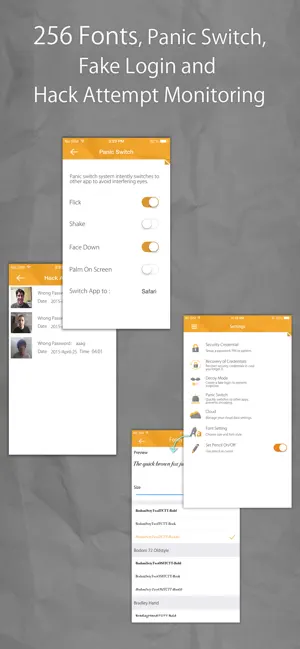
Hide the app from your home screen for total stealth. Privacy through obscurity.
Notes Lock - Password Note utilizes Advanced Encryption Standard (AES) with a 256-bit key. But what does that actually mean for you?
This is the same level of encryption used by government agencies to protect classified data.
It would take billions of years for the world's fastest supercomputer to crack a single AES-256 key.
Only your master key can reverse this process.
Clearing up the common misconceptions about your mobile data.
Lock screens protect against strangers, not the people you know and borrow your phone. Secondary gating is the only way to prevent internal device snooping.
Most cloud services store data in a way that their employees or hackers could potentially access it. Local-only encryption puts the key in YOUR pocket, not theirs.
Hiding is not securing. If a file isn't encrypted, a simple system search or file explorer can find it. Notes Lock encrypts the data so it remains gibberish even if found.
"Encryption is the only technical way to ensure data remains private in an increasingly public digital world."
Have experienced someone snooping through their phone without permission.
Leaving personal notes and banking passwords vulnerable to anyone who finds them.
For notes stored strictly with local-only military-grade encryption.
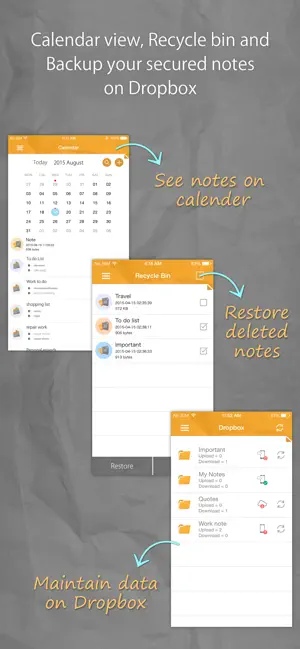
Never lose a memory or a brilliant idea again. Notes Lock - Password Note allows you to securely sync your encrypted vault with Google Drive or Dropbox.
Automated Backup
READY TO SYNC

Millions protect their unique intellectual property every day.
Songwriters, authors, and designers who need to keep their half-finished lyrics and concepts safe from prying eyes before launch.
Executives and lawyers who handle sensitive client data or confidential project details on their personal mobile devices.
Keeping passwords, medical information, and personal diaries secured in an all-in-one biometric environment.
Don't use the same code for your vault as your lock screen. A distinct code adds an essential second layer of gating.
Set a weekly reminder to run our encrypted Cloud Sync. It ensures your data isn't lost if your physical device is damaged.
Move high-risk items (banking details, password lists) into the deepest subfolders for extra protection from accidental peeping.
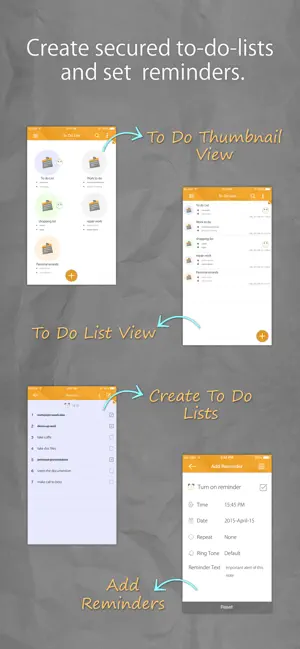
Create secured, secret notes without worrying about snoopers or hackers.
Quickly and conveniently set reminders for important notes and events.
Set up a password, PIN or pattern to secure your credentials.
Dynamically attach images to go along with your secured notes and memos.
Conveniently record voice reminders and memos with secured notes.
Manage your notes accordingly with a calendar view.
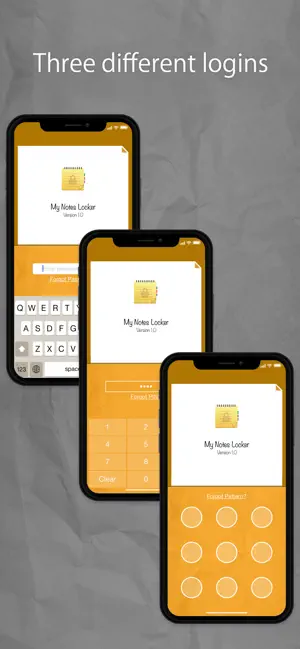
Manage all your secrets from a single interface. Organize notes into custom folders and separate your professional and personal lives.

Write freely with a powerful editor that supports full formatting. Elegantly hidden from prying eyes.
Integrates seamlessly with Face ID and Touch ID, offering hardware-level security that remains unbreakable.
Attach private photos or record audio memos directly. All attachments are encrypted along with your text.
Stay organized. Use the checklist feature to manage sensitive to-do lists without ever leaving the vault.

A step-by-step guide to keeping your sensitive iOS information away from prying eyes.

Learn why client-side encryption is the gold standard for data protection.

Advanced methods for staying anonymous and keeping your private life private.
Our dedicated support team at Newsoftwares LLC is ready to help you with any technical questions.